Visitor Management System
Introduction
With the move to Level 7 at the refurbished Petone Office, a new Visitor Management System was required given the need to support a reception capability.
The primary purpose of the system is to record access to the site by visitors and guests so that in the event of an emergency, the system would be able to determine who had entered and departed the site that day.
This document provides the detailed configuration and decisions to support the installation and deployment of the service.
Design Overview
The following diagram provides and overview of the solution, and the components.
:::DECISION Selection of SaaS Service
After a selection process, the selection of the Sign In App software as a service was chosen. :::

The following section will dive into the configuration deployed within the software to configure it for the Visitor Management System.
Sites
In this section, we will configure the Sites element which provides the majority of customisation for the service.
Details
The following table describes the key aspects of the site.
| Setting | Value | Notes |
|---|---|---|
| General | ||
| Site Name | Petone | |
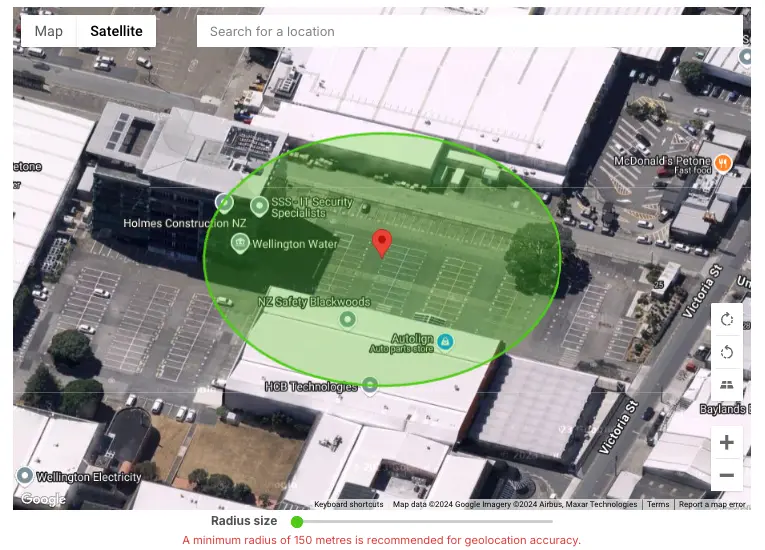
| Site Address | Level 7 25 Victoria Street, Petone Wellington | |
| Time Zone | UTC +13:00 - Pacific/Auckland (12:48 NZDT) | |
| Language | UTC +13:00 - Pacific/Auckland (12:48 NZDT) | |
| Reply to Name | Visitor Management | |
| Reply to Email | visitor@securitease.com | |
| Mobile Sign In | ||
 | ||
| Contactless | ||
| Message | Thank you for choosing Contactless Signin. | Introduction message displayed to visitors signing in using contactless. |
Group Visibility
Groups provide containers for configuration that can be used to alter the user experience for different use cases. We are deploying only three groups.
| Setting | Value | Notes |
|---|---|---|
| Visibility | All groups are shown. | By default the site will show all groups. Here you can change the groups visible to the site. |
Branding
Custom branding has been deployed to the reception iPad that is used. This can be altered, but for the initial deployment, this will be the look and feel.
| Setting | Value | Notes |
|---|---|---|
 |
Custom Fields
Custom fields can be used to collect extra information from your visitors. They can be set to appear on sign in or sign out.
| Setting | Applied To | Type | Notes |
|---|---|---|---|
| Sign In Fields | |||
| Company | Visitors | Test | |
| Visiting | Visitors | Notify List | |
| Car Registration | Visitors | Text | This is used to identify visitor vehicles and prevent clamping. |
| Reason | Visitors | Text | Used by the Unifi Application for visit reason. |
| Number of Packages | Deliveries | Number | |
| Package Recipient | Deliveries | Notify List | |
| Sign Out Fields | |||
| Retrieved | Deliveries | Signature |
Messages
Messages can be used to display important information to visitors and staff when they sign in.
| Setting | Value | Notes |
|---|---|---|
| Title | Health & Safety | |
| Content | YOUR PASS MUST BE WORN AT ALL TIMES. PLEASE RETURN YOUR PASS AND SIGN OUT UPON LEAVING All visitors are subject to the Company's Health & Safety regulations. In case of fire/emergency please report to the evacuation points for a roll call. Smoking in designated areas only. | |
| Attach a file | N/A | |
| Action | Checkbox that must be ticked (I agree) | |
| Checkbox label | I have read and understood the above | |
| Redisplay Message | When message is updated | |
| Email Copy to Visitor | Disabled | |
| Groups | Visitors |
Evacuation Points
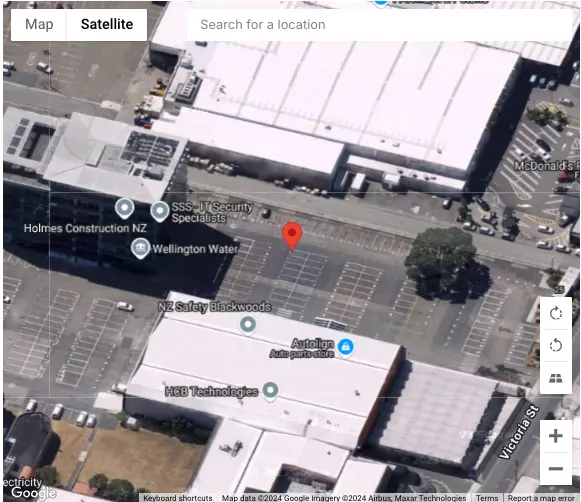
Evacuation points are site locations you can assign to groups or repeat visitors.
| Setting | Value | Notes |
|---|---|---|
| Title | Evacuation Point | |
| Icon | E | An evacuation point icon can be a custom letter/number |
 | ||
 | ||
| Defaults | Visitors / Employees / Staff | You can set the default evacuation point for each of this site's groups below. These can be overwritten for repeat visitors by editing a group member's settings. |
Privacy
Control how visitor information is displayed and how it can be interacted with.
| Setting | Value | Notes |
|---|---|---|
| Show autocomplete for returning visitors | Set | |
| Only show pre-registered names with an exact match | Set | |
| Hide visitors on the sign out list | Not Set | Decision on this in the register. |
| Hide the Sign In App logo on the thank you screen | Set |
Badges
Here you can select which badge template is used when printing visitor badges.
| Setting | Value | Notes |
|---|---|---|
 | ||
| Type | 54mm - Standard With Photo |
Features
Control which features are available for guests to utilise when signing in or out.
| Setting | Value | Notes |
|---|---|---|
| QR Code Scanning | Enabled | |
| Visitor Photos | Enabled | |
| Spaces | Not Licensed | |
| On Site Reports | Not Enabled |
Devices
Connect and manage which devices are linked to your Sign In App subscription.
| Setting | Value | Notes |
|---|---|---|
| Device Name | Petone-Reception | |
| Send Status Alerts | No |
Sign In Points
Sign In Points can be used to display static QR code on premises so visitors can register their presence without touching a device and a record of the visitor can be maintained.
| Setting | Value | Notes |
|---|---|---|
| Name | Reception Sign in | |
| Message | You are at reception. | |
| Groups | Visitors, Deliveries | |
| Hide Notify List | Enabled | |
| QR Code | Can be downloaded | |
| Can be downloaded |
Groups
Manage groups of visitors. Set up new returning visitors and show or hide groups from the app.
| Setting | Value | Notes |
|---|---|---|
| Visitors | Standard | Standard group for visitors. |
| Employees | Integration | Uses Entra GraphAPI enabled Webapp to retrieve staff details. |
| Deliveries | Delivery | Used for delivery / couriers. |
Visitors
Details
| Setting | Value | Notes |
|---|---|---|
| Group Name | Visitors |
Sign In Options
The following settings allow you to customise the sign in process that your visitors take. Changing options such as the welcome message or whether you wish for the iPad app to take a photo allows you to extend a tailor made greeting to your visitors.
| Setting | Value | Notes |
|---|---|---|
| Welcome Message | We have contacted the staff member, and they will be with you shortly. | |
| Print Visitor Badge | Enabled | |
| Safety check settings | Reject sign in when entry criteria is not met | Safety check ensure the people signing into this group meet your site entry criteria. When enabled, this option will check both your Block list and site Health certificate requirements during the sign in process. |
Sign Out Options
The following settings allow you to customise the sign out process that your visitors take. Here you can adjust sign out automation to handle visitors who forget to sign out upon leaving.
| Setting | Value | Notes |
|---|---|---|
| Sign Out Message | Thank you for visiting SecuritEase. | |
| Automation | Automatically clear group members in or out status | You can automate when group members are signed out of this group. This can help manage any visitors who did not sign out when they left. |
| Time | 00:00 |
Badges
Here you can override the site default badge and select a unique badge to be printed when a visitor signs in to this group.
| Setting | Value | Notes |
|---|---|---|
| Site Default | Enabled |
Pre-Registrations
Here you can adjust how pre-registrations work for this group, including customisation of the pre-registration email sent to pre-registered guests.
| Setting | Value | Notes |
|---|---|---|
| Preregistration email subject | Not Set | |
| Email Message | Not Set | |
| Email Attachment | Not Set | |
| Include Contactless Links | Enabled | |
| Include QR Code | Enabled | |
| Require Pre Registration | Not Enabled | |
| Pre Registration Approvals | Not Enabled |
Data and Privacy
Group privacy options allow you to fully control how group member data is displayed or stored across Sign In App.
| Setting | Value | Notes |
|---|---|---|
| Keep Visitor Data | for 1 day | This option will permanently delete all visitor data older than your selection, so use with care. Visitor data will be removed from our internal backups within 2 weeks after deletion. |
| Keep Visitor Photos | Aligned to Visitor Data retention | |
| Keep Visitor Badges | Enabled | |
| Store visitors sign in and out locations | Enabled | |
| Visibility | The following options allow control of how and where the group and its members appear within Sign In App. | |
| Show group on the Evacuation List | Enabled | This should be enabled to allow visitors to show up on the list |
| Show group on the iPad App | Enabled |
Employees
Members
| Setting | Value | Notes |
|---|---|---|
| Entra Directory | Group Synced |
Details
| Setting | Value | Notes |
|---|---|---|
| Group Name | Petone Staff |
Personal Fields
Personal fields allow you to collect additional information from your repeat group members. This information will be stored with their member details indefinitely unlike custom fields. There is a limit of 15 personal fields per group.
reorder
| Setting | Value | Notes |
|---|---|---|
| Field Label | ||
| Show this field on evacuation list | Not Enabled | |
| Show this field on host notifications | Not Enabled | |
| Allow this field to be seen by the group member | Enabled | |
| Field Label | Phone Number | |
| Show this field on evacuation list | Not Enabled | |
| Show this field on host notifications | Not Enabled | |
| Allow this field to be seen by the group member | Enabled | |
| Field Label | Role | |
| Show this field on evacuation list | Enabled | |
| Show this field on host notifications | Not Enabled | |
| Allow this field to be seen by the group member | Enabled |
Sign In Options
The following settings allow you to customise the sign in process that your visitors take. Changing options such as the welcome message or whether you wish for the iPad app to take a photo allows you to extend a tailor made greeting to your visitors.
:::NOTE This option is not enabled
This element applies to sign in of staff using the system. :::
| Setting | Value | Notes |
|---|---|---|
| Welcome Message | N/A | |
| Chance of Photo when a group member logs in | 0% | |
| Verify Identity | Not Set | |
| Visitor badge options | Not Set | |
| Safety Check | Don't check | |
Sign Out Options
The following settings allow you to customise the sign out process that your visitors take. Here you can adjust sign out automation to handle visitors who forget to sign out upon leaving.
| Setting | Value | Notes |
|---|---|---|
| Not Set |
Badges
Here you can override the site default badge and select a unique badge to be printed when a visitor signs in to this group.
| Setting | Value | Notes |
|---|---|---|
| Default used |
Notifications
Here you can adjust how group members receive different visitor notifications.
| Setting | Value | Notes |
|---|---|---|
| Notify Host | Set | |
| Sign Out | No notification. |
Companion App
Here you can adjust the companion app settings for this group. The companion app allows a group member to use their smartphone to access their QR code, mobile sign in, pre-register visitors, and view and export the evacuation list.
:::NOTE Not Used
This function is not enabled.
Onboarding
re you can adjust the onboarding settings for this group, including customising the welcome email group members receive. :::
:::NOTE Not Used
This function is not enabled.
Data and Privacy
:::
:::NOTE Not Used
This function is not enabled. :::
Deliveries
Details
| Setting | Value | Notes |
|---|---|---|
| Group Name | Deliveries |
Sign In Options
The following settings allow you to customise the sign in process that your visitors take. Changing options such as the welcome message or whether you wish for the iPad app to take a photo allows you to extend a tailor made greeting to your visitors.
| Setting | Value | Notes |
|---|---|---|
| Welcome Message | Not Set | |
| Print Visitor Badge | Not Set | |
| Scan Delivery Label | Enabled | |
| Safety Check | Don't check | Safety check ensure the people signing into this group meet your site entry criteria. When enabled, this option will check both your Block list and site Health certificate requirements during the sign in process. |
Sign Out Options
The following settings allow you to customise the sign out process that your visitors take. Here you can adjust sign out automation to handle visitors who forget to sign out upon leaving.
| Setting | Value | Notes |
|---|---|---|
| Message | Not set | |
| Automation | You can automate when group members are signed out of this group. This can help manage any visitors who did not sign out when they left. | |
| Clear Group Members | Never |
Badges
Here you can override the site default badge and select a unique badge to be printed when a visitor signs in to this group.
| Setting | Value | Notes |
|---|---|---|
| Default used |
Data and Privacy
Group privacy options allow you to fully control how group member data is displayed or stored across Sign In App.
| Setting | Value | Notes |
|---|---|---|
| Keep Visitor Data | for 7 days | This option will permanently delete all visitor data older than your selection, so use with care. Visitor data will be removed from our internal backups within 2 weeks after deletion. |
| Keep Visitor Photos | Aligned to Visitor Data retention | |
| Keep Visitor Badges | Enabled | |
| Store visitors sign in and out locations | Enabled | |
| Visibility | The following options allow control of how and where the group and its members appear within Sign In App. | |
| Show group on the Evacuation List | Enabled | This should be enabled to allow visitors to show up on the list |
| Show group on the iPad App | Enabled |
Events
:::NOTE Decision
This is not used at present. :::
Account Settings
Account Info
Here you can amend the client space information such as your company name and logo.
| Setting | Value | Notes |
|---|---|---|
| Company Name | SecuritEase | |
 |
SMS Tokens
Sign In App will send notifications when visitors arrive by email or text message (SMS). To receive SMS notifications, your account must have tokens available.
| Setting | Value | Notes |
|---|---|---|
| Not used |
Portal Users
Here you can add or edit portal users that have access to this client space. Adjust their access permissions and select who is your primary user or technical contact.
| Setting | Value | Notes |
|---|---|---|
| Name | Support | |
| Role | Administrator | |
| Site Access | All | |
| Tech Contact | Tick | |
| 2FA | Enabled |
Roles and Permissions
Here you can set up different user roles and the permissions associated with those roles.
| Setting | Admin | Standard | Notes |
|---|---|---|---|
| Audit log | x | Can view a full audit log of who made what changes when | |
| View today page | x | x | Can view the today page |
| View visitor locations | x | Can see the geo-location of sign-ins and sign-outs of visitors | |
| Sign in/out visitors | x | x | Can sign in/out repeat and standard visitors |
| Approve Pre-registrations | x | Can approve pre-registered users | |
| Sign out all | x | x | Can sign out all group visitors at once |
| View evacuation list | x | x | Can view the evacuation list for assigned sites |
| View evacuation reports | x | x | Can view evacuation reports |
Password Policy
This is where you can change the password policy for users logging in.
| Setting | Value | Notes |
|---|---|---|
| Password Never Expire | Never | |
| Force Reauthentication | 30 days | |
| Force 2 Factor | Set | |
| Prevent recently used passwords | Set |
Audit Log
| Setting | Value | Notes |
|---|---|---|
| Enabled | Yes |
Feature Management
Customise your Sign In App experience even further.
| Setting | Value | Notes |
|---|---|---|
| Shared Evacuations | Enabled | |
| Deliveries | Enabled | |
| Contactless | Enabled | |
| Remote Site | Not Enabled | |
| Pre-Reg Forms | Not Enabled | |
| Notifications | Enabled | Visitor Sign In Visitor Sign Out |
| ClientAPI | Enabled | API Key created. Used in API integrations. |
| Safety Check | Enabled |
Notifications
Notifications allow for Webhooks to be triggered for certain events.
There are two webhooks enabled:
- Visitor Sign In
- Visitor Sign Out
Visitor Sign In
| Setting | Value | Notes |
|---|---|---|
| Enabled | True | |
| Name | VisitorWebhook-SignIn | |
| Site | Petone | |
| Trigger | Sign In | |
| Group | Visitors | |
| Channel | Webhook | |
| Notification Settings | ||
| Webhook URL | https://signinwebhook.thoughtlabs.workers.dev/ | |
| Secret Key | Displayed in GUI |
Visitor Sign Out
| Setting | Value | Notes |
|---|---|---|
| Enabled | True | |
| Name | VisitorWebhook-SignOut | |
| Site | Petone | |
| Trigger | Sign Out | |
| Group | Visitors | |
| Channel | Webhook | |
| Notification Settings | ||
| Webhook URL | https://signinwebhook.thoughtlabs.workers.dev/ | |
| Secret Key | Displayed in GUI |
Safety Check
Each time a visitor signs in to a group with the Access Control feature enabled, your Block List will be checked to ensure they are allowed on to site. If the name appears on your Block List, that person will either be denied access or allowed on to site depending on the group settings.
| Setting | Value | Notes |
|---|---|---|
| Health Certificates | Not Used | |
| Block List | Not Used |
Evacuations
| Setting | Value | Notes |
|---|---|---|
Testing and Validation
Test Plans will be documented in the section 2 - Testing.
Appendices
Decision Table
The following is a list of key decisions and ownership.
| Decision | Description | Rationale | Owner |
|---|---|---|---|
| Use Microsoft Entra for staff identity details | Company standard for staff identity. | James Winskill | |
Controls Table
The following table describes the key control features of the service, and the rationale behind their use.
| Control | Description | Rationale |
|---|---|---|
| Separation of Networks | All networks are segmented and have no associated direct routing. All traffic is isolated to vLANs and Access control lists are used to inspect traffic. | Reduced surface area for attack. Good practice |
Admins Table
| Name | Role | Permissions | Notes | |
|---|---|---|---|---|
| Tim Jackson | tim.jackson@securitease.com | Super Admin | Super Admin | Initial Admin until signoff |
| James Winskill | james.winskill@securitease.com | Super Admin | Super Admin | |
| Chris McKenzie | chris.mckenzie@securitease.com | Super Admin | Super Admin |
Constraints Table
The following table provides a list of known constraints that have presented themselves during the initial build of the service.
| Constraint | Description | Treatment | Owner |
|---|---|---|---|
| Entra Sync - Push | Microsoft Entra can only sync changes such as new users. It currently does not de-provision or amend groups to existing users and cannot be used for portal access control. | Manual process to true up. | James Winskill |
| Cloud Backups | The system produces automated cloud backups. | Determine this is an acceptable place for system level backup data. |
Data Controls
The following table is in support of the Data Controls and Classification section in this document.
:::NOTE Information
This section is to advise on possible inclusion into SecuritEase’s risk management system. It is not a formal record of the control, nor the risk posed :::
| Control | Control Name | Control Description | Control Owner | Note |
|---|---|---|---|---|
| Encryption at Rest | Data Encryption | RSA 2048 Encryption | System Owner | |
| Encryption in Transit | Data Encryption | RSA 2048 Signing | System Owner | |
| RBAC | RBAC Access | Role Based Access Control implemented | System Owner | RBAC used to control access to system and personnel data |
| Data Sovereignty | Location of at rest data | SignInApp - AWS Australia iPad Petone Level 7 Entra ID - Azure Global | System Owner |
iPad Settings
Data Classification
Classification Types
Based on the NZ Government Data Classification Policy.
| Level | Description | Notes |
|---|---|---|
| Level 1 | Publicly Available Information | Public information only |
| Level 2 | Restricted Information | Restricted information, PII, confidential business information and client data. |
| Level 3 | Sensitive Information | Financial information, personal health data, legal or national security information. |
Data Sources
| Source | Types | Systems | Classification |
|---|---|---|---|
| Staff Data | Name | Entra | Level 2 |
| Visitor Data | Name (First + Last) Company Name Visit Reason Person Visiting Car Registration (optional) | SignInApp | Level 2 |
| Deliveries | Recipient Date / Time | SignInApp | Level 1 |
Systems
| Name | Description | Notes |
|---|---|---|
| Microsoft Entra | Used to populate staff data into the system. Controls group and rights assignments. Only certain groups are synced so not all staff records exist in systems. | |
| Office 365 Email | Used to send notifications of visitors to staff. It is used to send details to visitors (if used). |
Incident Response Design
Overview
:::NOTE Information
Good practice in Incident Response is to have any events reported in a standard way, and assign them to case owners as part of any ongoing investigation. PagerDuty has been configured to provide alerting capability. :::
Business Service
Business services provide a way to model capabilities that span multiple technical services.
| Area | Setting | Notes |
|---|---|---|
| Service Name | Petone Visitor Management | |
| Service Description | Visitor Management system events from Petone L7 office. | |
| Service Owner | James Winskill | |
| Team | Global Support Team |
Supporting Service
A service in PagerDuty represents a component, microservice or piece of infrastructure a team operates, manages, and monitors.
| Area | Setting | Notes |
|---|---|---|
| Service Name | Access Control Response | |
| Service Description | Response Plan to incidents relating to systems, or escalations to physical access to SecuritEase buildings or monitored systems. | |
| Service Owner | James Winskill | |
| Integrations | ||
| Event API | ||
| Slack Message | ||
| Workflow | ||
| Incident Workflow | ||
| Triage Event | Based on severity Alert areas. | |
| Assign Severity | Based on system categorisation of severity - map incident severity. | |
| Assign Priority | Assign priority based on severity | |
| Raise Incident | Create an incident - start a response process. | |
| Settings | ||
| Assign to Escalation Policy | ||
| Response Policy | ||
| Alert Mapping | Critical → High Error → High Warning → Low Info → Low Not Available → High | |
| Retrigger Ack Incidents | No | |
| Auto Resolve | No | |
| Responders and Stakeholders | ||
| Conference Bridge | ||
| Meeting URL | ||
| Response Play | ||
| Event Management | ||
| Orchestration Rule | ||
| Events create Incident | All Events Monitored | |
| All Events | Select any event | |
| Incident Priority | Set to Low | |
| Add Note | Set to Low by Rule | |
| Set Severity | Set to Warning | |
| Remediate | ||
| Documentation Link | ||
| Link Name | Visitor System - Response |
Prototype Integration with Unifi Access
Overview
A prototype to integrate the VMS with the UniFi Access Manager was undertaken. This activity created a locally hosted API to

Webhook Code
This code must be hosted locally as it talks to the Unifi Gateway locally.
:::NOTE Prototype Code
This code is intended as a guide to the prototype only. It was deployed as a microservice in ThoughtLabs Kubernetes environment. :::
// Constants
const SECRET = 'xxxxx';
const ACCESSURL = 'https://api.thoughtlabs.co.nz/api/v1/developer/visitors';
async function computeHmac(secret, message) {
const encoder = new TextEncoder();
const keyData = encoder.encode(secret);
const messageData = encoder.encode(message);
const cryptoKey = await crypto.subtle.importKey(

'raw',
keyData,
{ name: 'HMAC', hash: 'SHA-256' },
false,
['sign']
);
const signature = await crypto.subtle.sign(
'HMAC',
cryptoKey,
messageData
);
return Array.from(new Uint8Array(signature))
.map(b => b.toString(16).padStart(2, '0'))
.join('');
}

function mapWebhookDataToSignInFormat(webhookData) {
const visitor = webhookData.visitor;
const visiting = webhookData.visiting;
const [firstName, ...lastNameParts] = visitor.name.split(' ');
const lastName = lastNameParts.join(' ');
// Convert ISO 8601 date to Unix timestamp
const startTime = Math.floor(new Date(webhookData.event_at).getTime() / 1000);
// Set end time to the end of the day (23:59:59)
const endDate = new Date(webhookData.event_at);
endDate.setHours(23, 59, 59, 999);
const endTime = Math.floor(endDate.getTime() / 1000);

return {
first_name: firstName,
last_name: lastName,
remarks: `Visiting: ${visiting.name}`,
mobile_phone: visiting.mobile || "",
email: visiting.email || "",
visitor_company: visitor.additional.Company || "",
start_time: startTime,
end_time: endTime,
visit_reason: visitor.additional.Reason,
resources: [
{
"id": "xxxx",
"name": "xxxxxxx",
"type": "door_group"
}
]
};
}
function mapWebhookDataToSignOutFormat(webhookData) {
// For sign-out, we only need to return the visitor's name
// as we'll use this to query for the visitor's ID in the API
const visitor = webhookData.visitor;
return {
name: visitor.name
};
}
async function handleSignIn(webhookData) {
const apiData = mapWebhookDataToSignInFormat(webhookData);
console.log('API Data for Sign In:', apiData);
const response = await fetch(ACCESSURL, {
method: 'POST',
headers: {
'Content-Type': 'application/json',
'Accept': 'application/json',
'Authorization': 'Bearer xxxx',
'CF-Access-Client-Id': 'xxxxx',
'CF-Access-Client-Secret': 'xxxxx'
},
body: JSON.stringify(apiData),
});

if (!response.ok) {
throw new Error(`HTTP error! status: ${response.status}`);
}
return response;
}
async function handleSignOut(webhookData) {
const apiData = mapWebhookDataToSignOutFormat(webhookData);

// Query the API to get visitors
const queryResponse = await fetch(`${ACCESSURL}`, {
method: 'GET',
headers: {
'Accept': 'application/json',
'Authorization': 'Bearer xxxxxx',
'CF-Access-Client-Id': 'xxxxx.access',
'CF-Access-Client-Secret': 'xxxxxx'
},
});

if (!queryResponse.ok) {
throw new Error(`HTTP error! status: ${queryResponse.status}`);
}
const responseData = await queryResponse.json();

// Assuming the API returns an object with a 'data' property containing the visitors
const visitors = responseData.data || [];

// Parse the webhook data for first name and last name
const [firstName, ...lastNameParts] = apiData.name.split(' ');
const lastName = lastNameParts.join(' ');

// Find the matching visitor
let matchingVisitor = null;
for (let visitor of visitors) {

if (visitor.first_name.toLowerCase() === firstName.toLowerCase() &&
visitor.last_name.toLowerCase() === lastName.toLowerCase()) {
matchingVisitor = visitor;
break;
}
}
if (!matchingVisitor) {
throw new Error('Visitor not found');
}
const visitorId = matchingVisitor.id;

// Now we can delete the visitor using the ID
const deleteResponse = await fetch(`${ACCESSURL}/${visitorId}`, {
method: 'DELETE',
headers: {
'Authorization': 'Bearer xxxxx',
'CF-Access-Client-Id': 'xxxxx.access',
'CF-Access-Client-Secret': 'xxxxxx'
},
});

if (!deleteResponse.ok) {
throw new Error(`HTTP error! status: ${deleteResponse.status}`);
}
return deleteResponse;
}
export default {
async fetch(request, env, ctx) {
if (request.method !== 'POST') {
return new Response('Method Not Allowed', { status: 405 });
}

const signatureHeader = request.headers.get('x-signinapp-webhook-signature');
if (!signatureHeader) {
return new Response('Missing signature header', { status: 400 });
}
const [timestamp, receivedSignature] = signatureHeader.split(',');
const t = timestamp.split('=')[1];
const s1 = receivedSignature.split('=')[1];
const body = await request.text();

// Compute HMAC
const expectedSignature = await computeHmac(SECRET, `${t}.${body}`);

if (s1 !== expectedSignature) {
return new Response('Invalid signature', { status: 401 });
}

try {
// Parse the webhook data
const webhookData = JSON.parse(body);

let response;
if (webhookData.event === 'visitor.sign-in') {
response = await handleSignIn(webhookData);
} else if (webhookData.event === 'visitor.sign-out') {
response = await handleSignOut(webhookData);
} else {
return new Response('Unsupported event type', { status: 400 });
}

return new Response(`Webhook processed: ${webhookData.event}`, { status: 200 });
} catch (error) {
console.error('Error processing webhook:', error);
return new Response('Error processing webhook', { status: 500 });
}
},
};
Visitor Dashboard
:::NOTE Optional Component
The following is an optional component that could be used to show who is currently visiting a site. The service has a hosted web server that obtains details from the API of current visitors, and their status. :::
The following prototype is hosted in a CloudFlare Workers environment, pointing to a test instance of the Application.
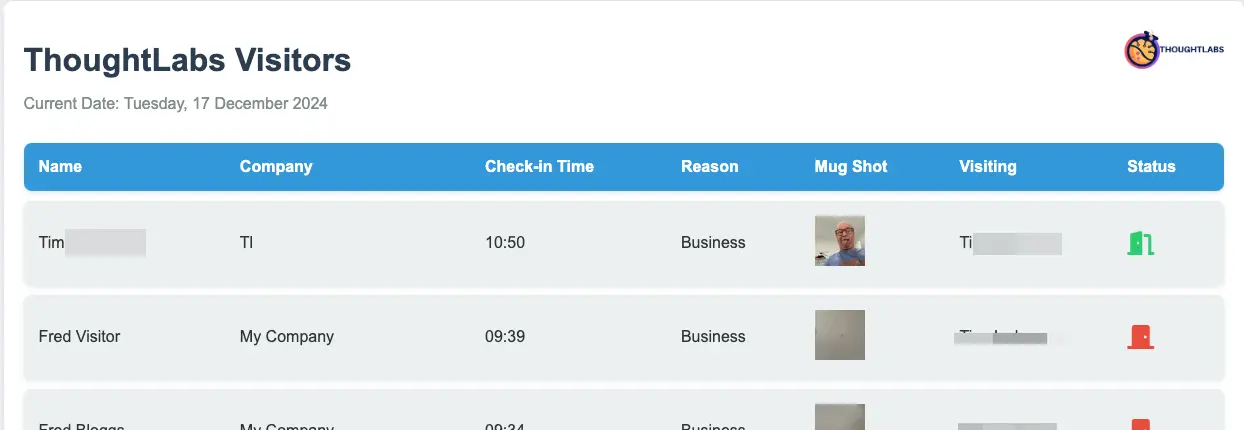

The code is as follows:
async function handleRequest(request) {
const API_ENDPOINT = 'https://backend.ap-se2.signinapp.com/client-api/v1/sites/3335/today'
const API_CREDENTIALS = 'xxxxxxx'
try {
const response = await fetch(API_ENDPOINT, {
headers: {
'Authorization': `Basic ${API_CREDENTIALS}`,
'Content-Type': 'application/json'
}
});
if (!response.ok) {
throw new Error(`HTTP error! status: ${response.status}`);
}
const data = await response.json();
let thoughtLabsData = null;
for (let i = 0; i < data.length; i++) {
if (data[i].id === 7736) {
thoughtLabsData = data[i];
break;
}
}
let tableRows = '';
if (thoughtLabsData && Array.isArray(thoughtLabsData.visitors)) {
if (thoughtLabsData.visitors.length > 0) {
for (const visitor of thoughtLabsData.visitors) {
const statusIcon = visitor.status === 'signed_in'
? '<i class="fas fa-door-open signed-in status-icon" title="Signed In"></i>'
: '<i class="fas fa-door-closed signed-out status-icon" title="Signed Out"></i>';
// Format the datetime to show only time
let formattedInTime = 'N/A';
if (visitor.in_datetime) {
const date = new Date(visitor.in_datetime);
formattedInTime = date.toLocaleTimeString('en-NZ', {
hour: '2-digit',
minute: '2-digit',
hour12: false, // This will use 24-hour format
timeZone: 'Pacific/Auckland'
});
}
let formattedOutTime = 'N/A';
if (visitor.in_datetime) {
const date = new Date(visitor.in_datetime);
formattedOutTime = date.toLocaleTimeString('en-NZ', {
hour: '2-digit',
minute: '2-digit',
hour12: false, // This will use 24-hour format
timeZone: 'Pacific/Auckland'
});
}
tableRows += `
<tr>
<td>${visitor.name || 'N/A'}</td>
<td>${visitor.additional_fields.Company || 'N/A'}</td>
<td>${formattedInTime}</td>
<td>${visitor.additional_fields.Reason || 'N/A'}</td>
<td>
${visitor.photo_url ?
`<img src="${visitor.photo_url}" alt="${visitor.name}" style="width:50px; height:50px; object-fit:cover;">` :
'No photo available'}
</td>
<td>${visitor.additional_fields.Visiting || 'N/A'}</td>
<td>${statusIcon}</td>
</tr>
`;
}
} else {
tableRows = '<tr><td colspan="7">No Visitors currently checked in</td></tr>';
}
} else {
tableRows = '<tr><td colspan="7">Visitors data not found</td></tr>';
}
const NZDate = new Date().toLocaleString('en-NZ', {
timeZone: 'Pacific/Auckland',
weekday: 'long',
year: 'numeric',
month: 'long',
day: 'numeric'
});

// Create an HTML response
const html = `
<!DOCTYPE html>
<html lang="en">
<head>
<meta charset="UTF-8">
<meta name="viewport" content="width=device-width, initial-scale=1.0">
<title>ThoughtLabs Visitors</title>
<link rel="stylesheet" href="https://cdnjs.cloudflare.com/ajax/libs/font-awesome/6.0.0-beta3/css/all.min.css">
<style>
body {
font-family: 'Arial', sans-serif;
margin: 0;
padding: 20px;
background-color: #f0f2f5;
color: #333;
}
.container {
max-width: 1200px;
margin: 0 auto;
background-color: white;
border-radius: 8px;
box-shadow: 0 0 10px rgba(0,0,0,0.1);
padding: 20px;
position: relative;
}
.logo {
position: absolute;
top: 20px;
right: 20px;
width: 100px; /* Adjust as needed */
}
h1 {
color: #2c3e50;
margin-bottom: 10px;
}
.date {
color: #7f8c8d;
margin-bottom: 20px;
}
table {
border-collapse: separate;
border-spacing: 0 10px;
width: 100%;
}
th, td {
padding: 15px;
text-align: left;
}
th {
background-color: #3498db;
color: white;
font-weight: bold;
}
tr {
background-color: #ecf0f1;
border-radius: 8px;
box-shadow: 0 2px 5px rgba(0,0,0,0.1);
transition: all 0.3s ease;
}
tr:hover {
transform: translateY(-3px);
box-shadow: 0 4px 8px rgba(0,0,0,0.15);
}
td:first-child, th:first-child {
border-top-left-radius: 8px;
border-bottom-left-radius: 8px;
}
td:last-child, th:last-child {
border-top-right-radius: 8px;
border-bottom-right-radius: 8px;
}
.mug-shot {
width: 50px;
height: 50px;
border-radius: 50%;
object-fit: cover;
}
.status-icon {
font-size: 24px;
}
.signed-in {
color: #2ecc71;
}
.signed-out {
color: #e74c3c;
}
</style>
</head>
<body>
<div class="container">
<img src="https://www.thoughtlabs.co.nz/images/TLLogo.png" alt="ThoughtLabs Logo" class="logo">
<h1>ThoughtLabs Visitors</h1>
<p class="date">Current Date: ${NZDate}</p>
<table>
<tr>
<th>Name</th>
<th>Company</th>
<th>Check-in Time</th>
<th>Reason</th>
<th>Mug Shot</th>
<th>Visiting</th>
<th>Status</th>
</tr>
${tableRows}
</table>
</div>
<script>

// Auto-refresh every 30 seconds
setInterval(function() {
location.reload();
}, 30000);
</script>
</body>
</html>
`;
return new Response(html, {
headers: { 'Content-Type': 'text/html' },
});
} catch (error) {
console.error('Error:', error);
return new Response('An error occurred while fetching employee data', { status: 500 });
}
}
addEventListener('fetch', event => {
event.respondWith(handleRequest(event.request))
})
End of Document